
Turning a Headshot Into a Pixel Art Sprite Sheet
Sun, 23 Aug 2026 10:00:00 EST
I wanted to see how far I could get turning a single headshot photo into a pixel-art character sprite sheet - the kind of 4-direction, 9-frame walk-cycle grid you'd drop into an old-school RPG. Everything had to run locally on a laptop RTX 4060 with 8GB of VRAM, so no cloud GPUs, no giant models. This post covers what I originally set out to build, why the "obvious" approach failed after a lot of testing, and the very different approach I ended up using instead. I've included some of the actual test outputs along the way.
The Original Plan: Split Style and Identity
Training one model to learn both "pixel-art style" and "this specific person's face" from a small, from-scratch dataset isn't realistic on consumer hardware. So I split the problem in two, following the standard approach used by a lot of community pixel-sprite tooling:Identity was going to come from IP-Adapter-FaceID, a pretrained face-identity adapter for Stable Diffusion. You don't train this part - you download the weights and condition generation on the input headshot's face embedding at inference time.
Style and layout was going to come from a LoRA I'd train myself, fine-tuned on a set of pixel-art sprite sheets that all shared one consistent grid layout, teaching the base model to reliably reproduce that exact grid-of-poses format.
The plan: headshot in, face embedding plus the trained style LoRA plus Stable Diffusion 1.5, sprite sheet PNG out.
Building the Training Set
It was hard to find CC0 sprite sheets in a consistent grid, pose, and style. Training a LoRA to reproduce "a grid" when the grids in the training data don't agree with each other is a recipe for an unreliable output grid, so I scrapped that set.I switched to compositing my own 200-image training set from the Universal LPC Spritesheet Character Generator's asset repo - body, hair, and clothing layers combined programmatically, all sharing one 576x256, 9-frame x 4-direction walk-cycle layout. Hair color was randomized per sheet by recoloring against the LPC project's own named color palettes. First pass at "randomized" hair turned out to not be randomized at all - every hair asset ships in one default reddish-orange.
Training the Style LoRA
Using kohya_ss / sd-scripts against SD1.5, the first training pass (40 images, network_dim 32, 10 repeats x 20 epochs) overfit hard and memorized one specific character no matter what the prompt said. Growing the dataset to the full 200 images and backing off to network_dim 16 / 2 repeats / 8 epochs fixed it - multi-prompt sanity checks confirmed hair color and body type now actually followed the prompt instead of collapsing to one look.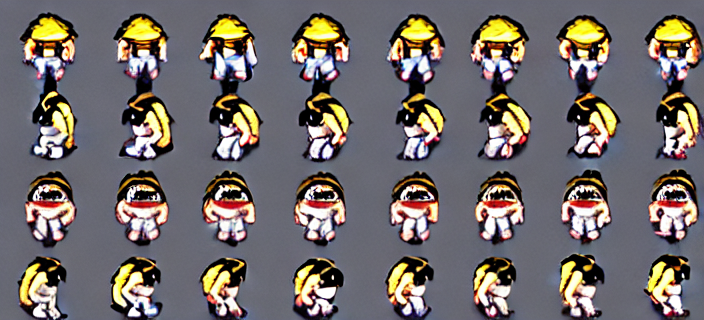
Phase 3: Identity Integration (This Is Where It Fell Apart)
With the style LoRA working, the next step was wiring in IP-Adapter-FaceID so a headshot photo would drive the identity of the generated character. First I confirmed the adapter plumbing actually worked in isolation - feeding it a headshot with no pixel-art LoRA loaded, just plain photorealistic SD1.5 portrait generation.
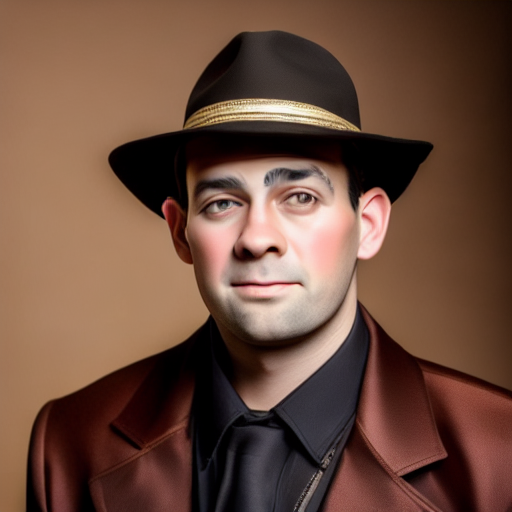
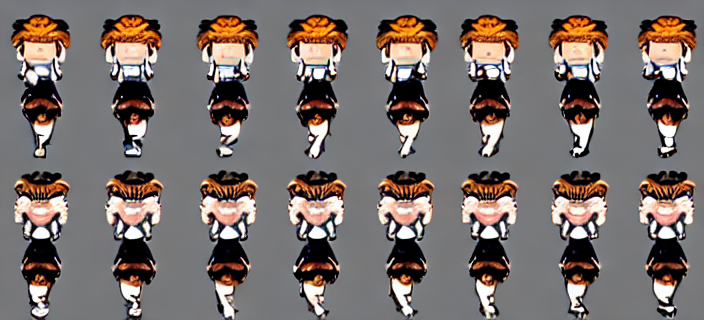
The root cause, as far as I could tell: IP-Adapter-FaceID's identity LoRA and its cross-attention face conditioning are both applied globally across the whole canvas. That's fine for a single portrait. It's a bad match for a 32-cell sprite grid, where each cell needs to render an independently distinct pose while the identity conditioning is simultaneously pulling the entire canvas toward "one face." The two objectives fight each other at the pixel level, and nothing I tried found a stable compromise.
After exhausting the reasonable parameter space, I marked Phase 3 a dead end and went looking for a different approach.
The Approach That Actually Works: No Diffusion at All
The pieces that already worked were the deterministic ones - the LPC compositing pipeline that built the training set in the first place always produced a clean, legible sprite sheet, because it's just assembling real hand-drawn asset layers rather than asking a diffusion model to hallucinate a coherent 32-cell grid from noise. So I dropped diffusion from the identity path entirely and built a pipeline that composites a real sprite sheet directly from the headshot:1. Face detection - InsightFace (SCRFD) finds a face bounding box and landmarks in the headshot. Tightly-cropped close-up photos failed detection outright at the default settings, so there's a fallback cascade that retries at smaller detection sizes until one succeeds.
2. Color sampling - median RGB is sampled from the headwear, hair, skin, and clothing regions of that bounding box, then matched to the nearest named color in the LPC asset repo's own palette data. Plain RGB distance kept favoring gray swatches over correctly-hued ones by chance, so the matching now uses only the palette's mid-tone swatches plus a penalty for saturation mismatches.
3. Attribute detection - CLIP zero-shot classification checks the photo for a hat, a jacket versus a plain shirt, one of ten curated hairstyle categories, and glasses, so the right asset layers get picked automatically with no manual flags needed.
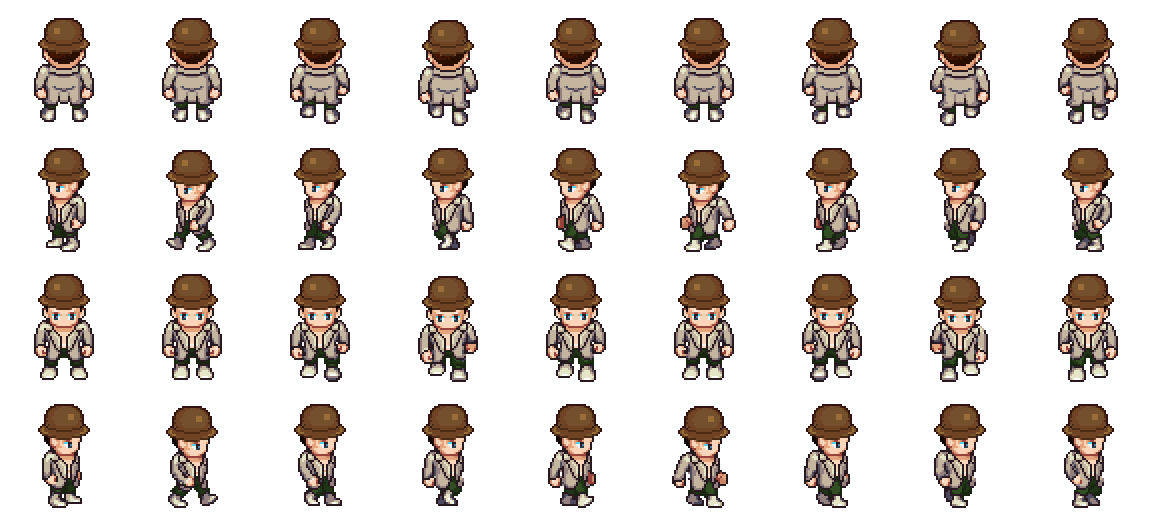
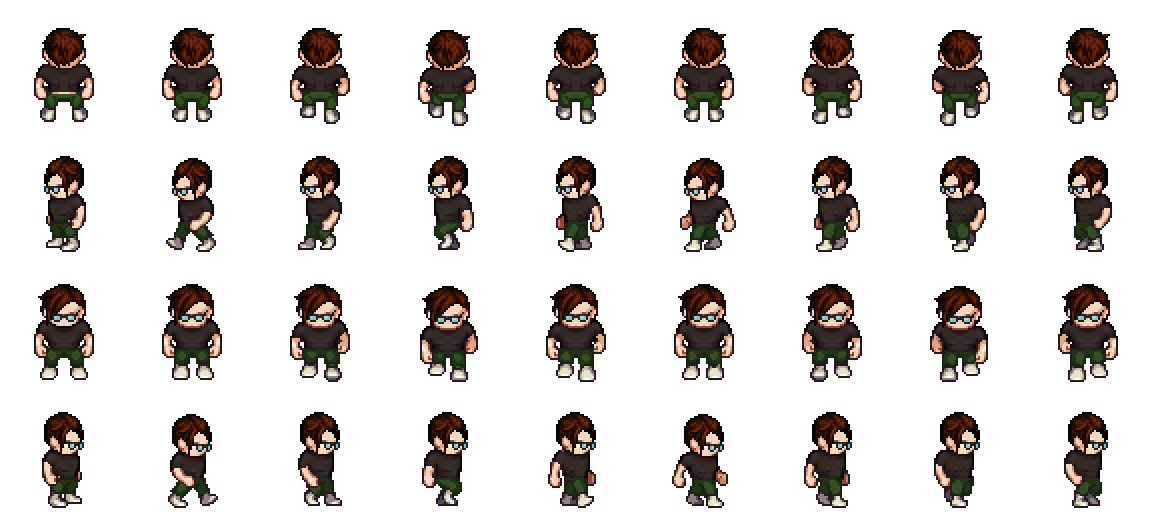
4. Compositing - the matched LPC layers (body, head, eyes, hair, torso, hat, glasses) get stacked into the same 576x256 walk-cycle template used to build the training set. Pre-recolored assets like jackets and hats get picked by matched palette name; plain-colored assets like a t-shirt get recolored with a multiply-blend tint instead, which preserves the garment's own shading - an earlier attempt using straight hue substitution washed out badly on dark, desaturated colors.
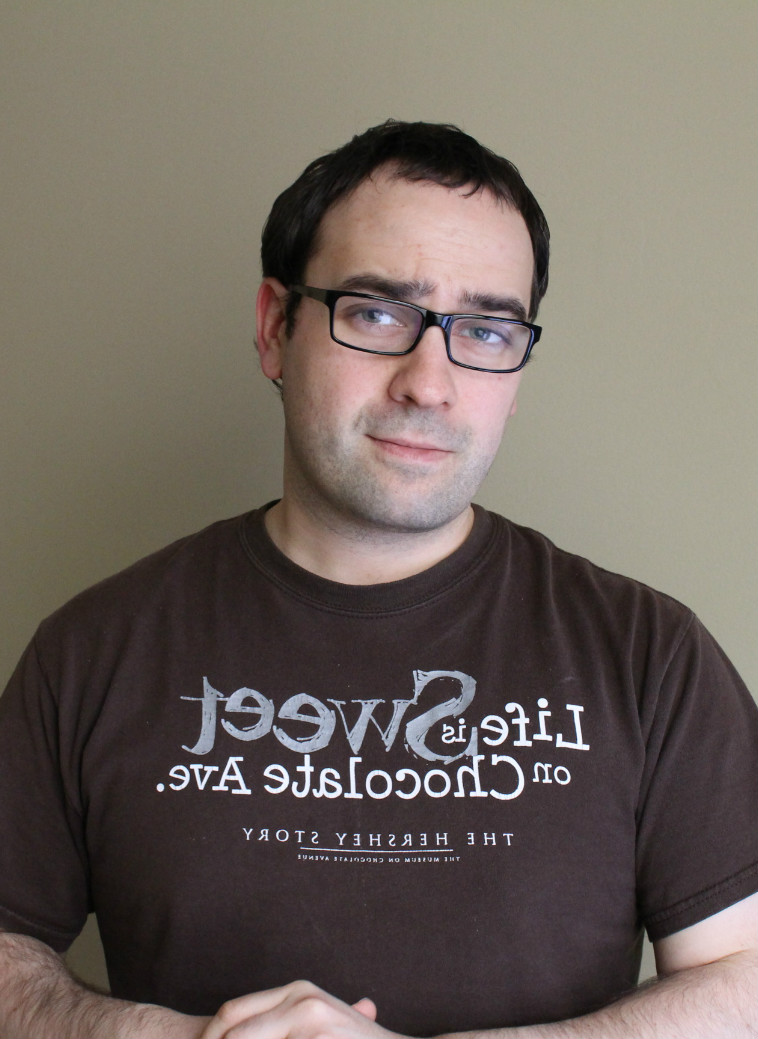
Here's what that pipeline produces from the two test headshots.
Licensing
This matters enough to call out on its own: the sprite assets this pipeline draws from - and the sheets used to train the (now-unused) style LoRA - come from the Universal LPC Spritesheet Character Generator project. They are not CC0. They're licensed CC-BY-SA 3.0 / GPL 3.0 (the project aggregates contributions from many pixel artists, each retaining their own license terms within that family). That means share-alike and attribution requirements apply to anything built from these assets.What's Left
This is an old school technique made a lot easier with models mixed in. I still want to figure out the recipie for a diffusion based solution, then eventually get that to run on lightweight devices.

Charles Palen has been involved in the technology sector for several years. His formal education focused on Enterprise Database Administration. He currently works as the principal software architect and manager at Transcending Digital where he can be hired for your next contract project. Charles is a full stack developer who has been on the front lines of small business and enterprise for over 10 years. Charles current expertise covers the areas of human pose estimation models, diffusion models, agentic workflows, .NET, Java, Python, Node.js, Javascript, HTML, and CSS. Charles created Technogumbo in 2008 as a way to share lessons learned while making original products.
Comments
No one has posted any comments yet, be the first
Comments are currently disabled.
